 Overhang
What it does
Three things, and nothing else.
Finds what is hidden
Lists every status item macOS dropped, each with the icon of the app that owns it.
Opens them normally
Click an entry and that item's own menu opens, just as if you had clicked it in the bar.
One optional permission
Everything except click-through works with nothing granted.
A closer look
One control in the bar, everything else out of the way.
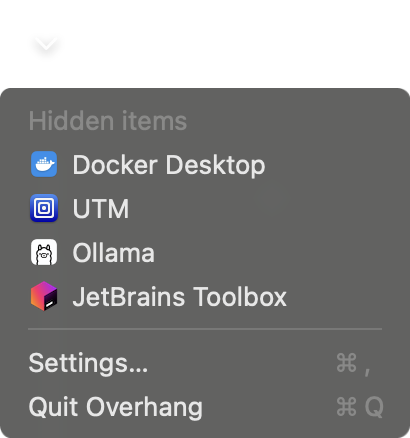
Everything that went missing
One click lists every status item macOS stopped drawing, each with the icon of the app that owns it. Pick one and its own menu opens.
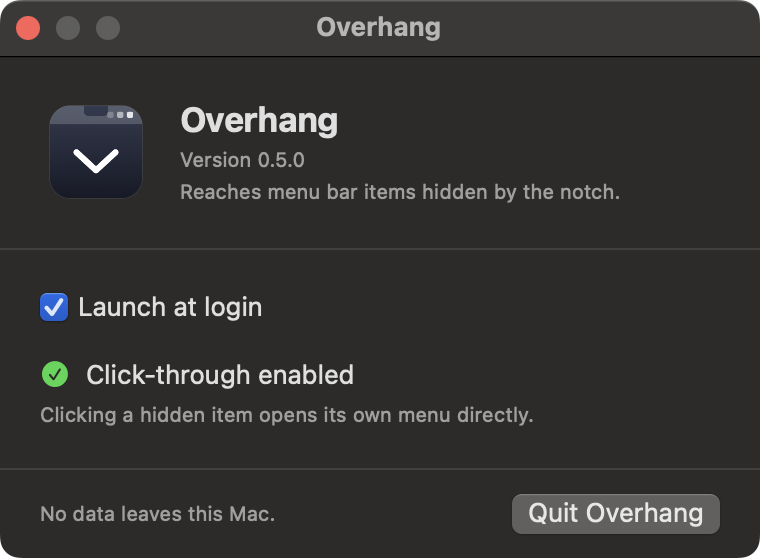
Two settings, no more
Launch at login, and whether click through is enabled. The whole app fits in one window.
Install
Download the app
- Download Overhang A disk image for macOS 14 and later. Universal, Apple silicon and Intel. Under 2 MB.
- Drag it to Applications Open the disk image and drag Overhang across. The window shows you where.
- Launch it Double click. Overhang is signed and notarized by Apple, so it opens normally with no warning and no right click.
- Turn on click through Optional. Grants Accessibility so a hidden item opens its own menu when you click it. Overhang works without it.
Homebrew
One command, and brew upgrade keeps it current.
brew install --cask nicglazkov/tap/overhang
Build from source
Needs Xcode 15 or later and XcodeGen.
brew install xcodegen
git clone https://github.com/nicglazkov/overhang.git
cd overhang
make install
FAQ
Does Overhang need any permissions?
One, and only if you want click-through. Finding and listing items works with nothing granted. Enabling click-through asks for Accessibility, which lets a hidden item open its own menu when you click it. Decline it and clicking an entry brings that item's app to the front instead.
Why does it never ask for Screen Recording?
Other menu bar managers need it because they redraw other apps' status item images, and capturing those pixels requires permission. Overhang draws each app's own bundle icon instead, so the question never arises.
Is Overhang signed and notarized?
Yes. It is signed with an Apple Developer ID certificate and notarized by Apple, so it launches normally with no warning. You can confirm this yourself, see the security policy.
Some hidden items do not respond when I click them.
Items built on a standard menu open directly. A few apps handle the mouse event themselves and ignore anything else, so Overhang cannot press them. Those fall back to bringing the app itself to the front. This depends on how the app was built, not on where its icon sits.
Do I need a Mac with a notch?
No. The notch makes the problem worse by removing usable space, but any full menu bar drops items. Overhang behaves the same on external displays and older Macs. See requirements for detail.
What does it cost?
Nothing. Overhang is free and MIT licensed, and the full source is on GitHub.
Before you install
Privacy Policy
What Overhang collects, which is nothing, and what the app reads on your Mac.
Security Policy
Signing, distribution, what the optional permission allows, and how to report a problem.
Requirements
Supported systems, display compatibility, build requirements and known limitations.